This is nice.
2023.11.30.
2023.11.29.
Follow-up on Liked “MailMate”:
I just bought MailMate a couple of minutes ago. It turns out I love to use plain-text email for writing and reading. It’s just way easier to edit my emails in MacVim than to fuck around with the Mail.app compose window.
The Things integration is also pretty cool. I can get the complete plain-text email in the to-do note, which is way more excellent than the jumbled text-fest I had previously parsed by the Things mail service forwarded from Mail.
I’m still developing my workflow around the rule-based smart mailboxes, which are pretty powerful.
I’ll write more about this app in the future.
So, I should be able to move the MarsEdit micropost window around now and attach pictures to a post right there.
Messing with Play and YouTube subscriptions
-
Play 2.0 just got released with a new channels feature.
-
It’s behind a subscription, but you can try it for seven days.
-
-
I started using Play as a replacement for YouTube’s Watch Later list (and for other sites too, like Vimeo).
-
YouTube is an attention magnet, and I want to avoid it when possible.
-
Using the Watch Later feature makes this more hard.
-
Play keeps me out of the YouTube app, mostly…
-
-
I also follow YouTube channels using RSS from Reeder instead of the YouTube app.
-
This way, I have an integrated workflow of browsing videos, blog posts, Mastodon posts, etc.
-
I’m also trying to give minimal data to Google through YouTube other than my watch history.
-
I have watch history turned off, but I’m sure Google still tracks it.
-
-
Because of this workflow, it seems redundant to use Play to subscribe to the same list of YouTube channels.
-
-
I added my list of channels to Play anyway to test the Channels feature.
-
It was a bit annoying since Play has no Shortcuts integration for managing channels or OPML import.
-
-
I don’t have a conclusion on the usefulness of this feature for me yet, but I’ll test it in the following week, and we will see if I keep the subscription or not.
2023.11.28.
Read “Production design of “True Detective” – interview with Alex DiGerlando · Pushing Pixels”
Midway through the interview we talk about his work as the production designer on the “Beasts of the Southern Wild”, and then dig deep into the strikingly designed worlds of the first two seasons of “True Detective”.
I loved season one of True Detective.
2023.11.27.
Read “Neil Gaiman’s Radical Vision for the Future of the Internet – Cal Newport”
Between 2012 to 2022, we came to believe that the natural structure for online interaction was for billions of people to all use the same small number of privately-owned social platforms. We’re increasingly realizing now that it was this centralization idea itself that was unnatural. The underlying architecture of the internet already provides a universal platform on which anyone can talk to anyone else about any topic.
Read “Spreadsheets and Small Software – nilenso blog”
These sheets are like regular programs in many ways. Felienne Hermans, a veteran spreadsheet researcher, puts it very simply: Spreadsheets are code. She also goes on to show that they suffer from the same problems as real software.
2023.11.25.
Bookmarked “Marta”
File Manager for macOS.
Native. Extensible. Fast.
2023.11.24.
Bookmarked “Flamed Fury”
Kia ora! 👋 I’m fLaMEd🔥, the digital artisan behind Flamed Fury. Since 1996, I’ve been a keen Web surfer. This homepage is my homage to the net.
2023.11.23.
Reviewing append-only workflows
There are multiple systems where you can only append new information at the end of the chain. There is no chance to modify the history in these workflows (or it’s very convoluted).
But why is it beneficial to use an append-only workflow? I’ve been fascinated by these systems lately since we can learn so much about our workflows by keeping previous states around.
The core idea of an append-only information storage system is to only add new information without removing existing data, which has excellent benefits: we can see ideas getting developed, we can keep versions of a file, or we can capture information for the historical sake of it.
Analog systems like the Antinet Zettelkasten or the Bullet Journal force us to organize information by appending it. Digital systems can be used like this too, but they need the right mindset from us so we don’t remove mistakes.
In this post, I’ll discuss using email, Zettelkasten, and Git in the append-only information organization context.
Email is a popular workflow for developing ideas
In essence, idea development leverages the fact that you rely on the history of the idea as you progress it. Its history serves as a breadcrumb to go back in time and see how it was developed.
Drafting something is a long process, and the most apparent tool some people use is email. It can be a great append-only note-taking tool and storage medium. Here’s an excerpt from How I use append-only log to store information:
If you are working on a piece of text for a long time, you can just keep it as a draft and keep working. It will be auto-saved.
I am a fan of the bullet journal method. Handwritten text is immutable. The same goes for emails. Once you send it, it becomes immutable.
To show another example of how email can be used for drafting, here’s how Steve Jobs used email to write his Stanford commencement speech:
In January 2005, John Hennessy, the president of Stanford, asked Steve to give the commencement address to that spring’s graduating class. Steve agreed.
On and off for the next six months, Steve took stabs at writing his talk. He emailed stories and memories to himself. He asked friends, Apple colleagues, and the screenwriter Aaron Sorkin for their thoughts. In the end, however, he wrote the speech on his own. Even three days before the event, Steve was unsatisfied with his talk. He sent it to a friend, warning, “I’ll send it to you, but please don’t puke. I never do stuff like this.” He was still refining the speech the morning that he gave it. Uncharacteristically, Steve read from the lectern, rather than memorizing his text (as he did with Apple keynotes) or speaking extemporaneously from a few scrawled notes (as he did in nearly every other talk).
Steve was happy with the speech—he emailed himself a copy a few days after giving it—but he generally deflected the praise that he received for it. “I bought it on CommencementSpeeches.com,” he joked to one person. The commencement address has been viewed millions of times online and is included[…]
Steve Jobs once mentioned that he constantly sends notes to himself in his inbox as a reminder. This process is similar to the capture method used in Getting Things Done (GTD). However, GTD does not address how we can use our inboxes to develop ideas further.
Using our email Inbox effectively to develop ideas
Sometimes, I also use email to develop ideas in my inbox during the GTD capture phase. Although I think there are better tools for this – like Drafts or my Zettelkasten – some conversations are present only in email, so I can leave notes for myself in a thread by starting a reply to a message and sending it to my address. This workflow feels like a poor man’s version of HEY’s sticky notes.
I have a separate “Inbox” contact card saved with the +captured text appended to my email address (someone+captured@domain.com), so when I want to remind myself about a message, I’m emailing ideas to this address and use the conversation view in Mail to develop them further by replying in place.
I can also schedule these messages, which act like an integrated Tickler File. I can leverage that Mail has an excellent conversations view, so the Send Later feature can resurface any thread when I’m scheduling a forwarded message to myself. It will reappear in my Inbox with the whole conversation, which gives me the context to figure out what the note is about.
A quick aside about Remind Me and Follow-up in Mail: We have features in Mail in iOS and macOS that could be useful for emailing follow-ups, but they have two problems.
- Remind Me only works for emails in the inbox, so if I archive an email, it silently moves it to the top of the Archive mailbox which is useless.
- Follow-up is a black box driven by “AI,” and there is no way to set it up manually for specific emails that I want to track.
- It uses three days by default, but I’m not sure if it works for every sent email.
- On the other hand, I also use a GTD “Waiting for…” list to track items waiting for a reply. → 2.7.8
To conclude, emailing notes to ourselves is semi-private. We’ll see the email as part of the thread, but others won’t. This way, we can leave notes in place, even in threads with others.
Here are some concrete contexts where I’m adding notes in an email thread:
- code review comments
- ideas about a project we’re discussing
- capture an idea on the phone, which can be seen later on the desktop when I’m processing emails
Appending information in a bottom-up system like GTD and Zettelkasten
Both GTD and Zettelkasten are bottom-up approaches for getting a grasp on ideas. These frameworks don’t start with what we want to achieve but what we have now.
In GTD, the idea development process is the Natural Planning Model. In a Zettelkasten, this is the follow-up note method (or Folgezettel): letting ideas be developed naturally.
The outline-based Zettelkasten
As I mentioned, follow-up notes show how an idea was sparked and developed over time. Understanding this development process heavily depends on the context of the actual Folgezettel.
Since follow-up notes show us the idea development, we can safely say that we aren’t storing the result of our thinking but the thinking itself.
What’s more important is to keep these ideas structured so we can follow their line of thinking even for years to come.
I can’t say that Luhmann’s Zettelkasten implementation was a big outline because it is way more complicated than that. But I still like to organize notes in a master outline structure for my version of the Zettelkasten since high-level branches are what get me started on an idea that becomes something more complex later.
The Zettelkasten outline shows me the history of idea development. When I add a new note to the Zettelkasten outline, its place will define the order of the note relative to others. It means that the note is connected to a parent and/or a sibling so that I can see the development of an idea in a thread-like structure.
I only append to the Zettelkasten outline and never move stuff around since I use numeric IDs to mark their fixed position. This is a customized version of the alphanumeric note ID that Luhmann used in his Zettelkasten.
Since mine is organized in an outline structure, there is no need to link all notes to every direction. In the tree structure, all notes can be connected to a parent, next, and previous sibling. Not all of these connections are present, but one will be there since a note needs to be appended somewhere in the outline.
Because we usually organize conversations around threads, our thought development can be understood as a conversation with ourselves (or our Zettelkasten, if we use the analogy by Niklas Luhmann).
The outline-based Zettelkasten will force us to think about the place of a note in relation to other notes. Much like the physical Zettelkasten, in an outline-based digital version, we have to append the note to a tree structure. This method will ensure that we automatically have follow-up notes.
The capture log
One of the most interesting steps of GTD is the capture step. A capture log is a journal-based version of the inbox, where ideas are appended in a timeline-based manner.
The capture log was an idea first mentioned by Merlin Mann, where he explained that he wanted to yell into the void and let Siri capture his ideas with automatic metadata like creation date, location, and, optionally, the weather. It’s yet another inbox that we have to process.
The inbox is a medium that stores items that change frequently. It is a temporary holding place for new information in the short term. We mainly change information in it (add and remove), but in the append-only workflow, these items can be kept as an idea log, too. If we use inbox items as a trigger to create new projects and/or next actions in our GTD system, after creating these, we can complete source items in the inbox and log them. In that sense, we have a capture log as an automatic journal where we keep a history of our ideas. As Merlin said, it’s like the tail of our life.
Keeping versions
There are two ways people keep file versions around. If you worked on any source material like Word or Photoshop documents, you are probably familiar with versioning your files using the “Save As…” command.
There is an ongoing meme about sending the “final final final” version to a client, so in theory, this is not a desirable workflow. Still, with a proper workflow in place, we can use it to mark milestones in a document lifecycle.
But before we go there, let’s talk about Git since it’s a tool created for this exact task: keeping versions of files.
Versioning with Git
Git is an append-only information storage system, too, because when we change code in the software development context or update any text kept in a Git repository, we’re adding a new state to a source material. We pack it up in a commit, which is then appended to the log.
Versioning makes software development more manageable since we don’t have to worry about how changes are looking in our working copy: the code is constantly forming. The state stored in Git will show changes, mistakes, refactorings, and removals, which is the natural part of everyday work. Git lets us see the natural evolution of the code base, which is similar to other examples mentioned here.
Git can be used for keeping the history of non-code-based source files, too, like photos, illustrations, PSD files, Markdown writings, etc. My Zettelkasten is a Git-based source material, which I use as a starting point to write about interesting ideas.
People forget that Git isn’t just tied to store source code. We can create a Git repository for almost any source material we’re working on and keep a history of the evolution of these files.
Keeping manual versions
Sadly, keeping a Git repository works only with file-based apps. It doesn’t work for database-based apps like Ulysses, which I’m writing this article in.
On top of Git, it’s still worth keeping manual writing versions, especially after reaching milestones like the first draft, the first edit, or the version before spell-checking. We can usually keep manual versions around in database-based applications by simply duplicating the primary resource of the app.
I like how Aaron Draplin duplicates layers in Illustrator to keep a history of changes and branch out new ideas. In the same way, I duplicate groups in Ulysses for writing projects so that I can have a trackable / branchable writing workflow. Ulysses also keeps versions of projects, but manual versioning can be tied to milestones in the writing workflow.
My versioning system is based on the following rules:
- I keep a group where all sections are sheets, then I duplicate these groups before significant edits and assign version numbers for each group, like v1, v2, etc. These names have no meaning other than having a version number for the group.
- The triggers for duplicating groups can be the following:
- Collected and sorted my Zettelkasten notes.
- Finished the first draft.
- Checking grammar with Grammarly (which is just another form of editing).
- The final version before publishing the post.
- It can change, so this group will allow me to compare what type of changes I usually make after I publish something.
Conclusion
In this post, I collected many workflows that follow the append-only organization system. To recap:
- Email can capture information and take notes in conversation threads.
- The outlined-based Zettelkasten allows us to create follow-up notes for long-term thinking and idea development.
- Git and manual versioning is a great way to try out new ideas on source files.
These workflows are appending new information at the end of a stack, so we will have a breadcrumb to see how changes affect our work over time.
The main idea I would like to highlight is that by appending information, we don’t delete anything; we add new information at the end. Having all changes visible in the chain (even the bad ones) makes it harder to erase mistakes.
Giving up the IndieWeb markup on bookmarks for now
-
I’m giving up the IndieWeb markup with bookmarks, since they kinda hard to get right.
-
All I want is a title and a
blockquote, but with the IndieWeb markup I have to have a post content just to markup the link properly. -
So, instead, I just add the “Bookmarked”, “Read”, “Liked”, etc. verbs to the title of the post and be done with it.
-
If someone has a better idea, let me know.
Bookmarked “The endless uses for an always-on Mac”
I’ve had a Mac running as a server in my house for more than 20 years now, and I have zero regrets. As I detailed five years ago, the specific uses for my always-on Mac have changed numerous times over the decades, but the various Macs that have served the purpose have always made themselves useful.
Bookmarked “Pile of Index Cards | Flickr”
Pile of index cards, as a cultural genetic code.
Publish bookmarks from DEVONthink
-
I’m messing with my bookmarks today.
-
I keep a lot of cool articles in DEVONthink as my central repository, but I also want to share some of these links here.
-
I’m testing a simple workflow for this using a DEVONthink smart group, which shows me all my bookmarks from my Decoding database that aren’t published yet.
-
I’m using DEVONthink custom metadata to mark a record “published”.
-
-
This workflow desperately needs automation, but I want to start as simple as possible and see how it works in practice.
Read “Ben’s Journal: Cutting the electronic cord: Setting up a fully paper TODO list tracking strategy”
While git + emacs + org-mode was certainly functional, I never had cause to do anything particular sexy with the setup. In fact, I was hoping this experience would convert me from a fan of subversion to a fan of git, but alas, it only reinforced my appreciation for the simplicity of subversion.
The index cards, on the other hand, were a joy to use. I love that each project is represented by a single card, and that spreading out the cards gives me an overview of all possible tasks to work on:[…]
Bookmarked “My system for Getting Things Done on Vimeo”
“Getting Things Done” is a great, lightweight system by David Allen for managing all the stuff you’re working on (or want to work on). Here’s how I’ve implemented it.
An old video about Getting Things Done. It needs a Vimeo login to watch.
Read “Young Users No Longer Know How to File and Navigate”
People don’t understand the concept of files and folders any more
This is not a great trend.
Checking webmentions from Bike
-
I also want to check if webmentions are triggered via the WordPress API.
-
Update
-
They do!
-
Bookmarked “Ducklet.app”
The fast, native SQLite database editor for macOS.
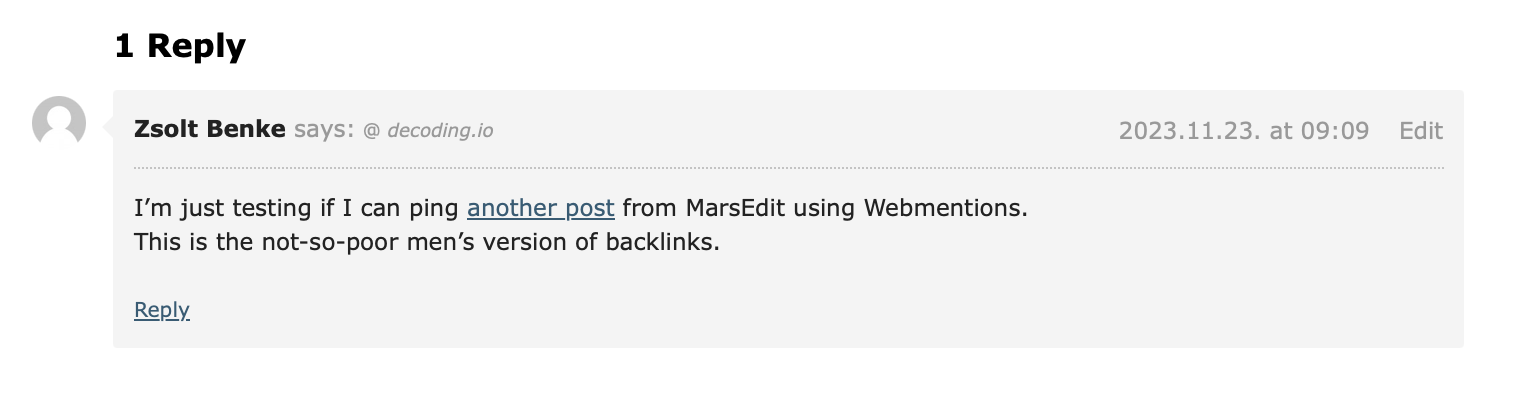
I’m just testing if I can ping another post from MarsEdit using Webmentions.
This is the not-so-poor men’s version of backlinks.
Update: looks like it worked!
Liked “MailMate”
MailMate is an IMAP email client for macOS featuring extensive keyboard control, Markdown integrated email composition, advanced search conditions and drill-down search links[…]
Sometimes, I wonder if I should try to use MailMate instead of Mail.app (at least for some specific tasks). It’s an app made for nerds.
I think it’s even have MacVim integration, and still makes emails available in the filesystem instead of closing them away for Spotlight only.
Related
Adding Safari selection to my “Respond on Decoding” shortcut
-
It is actually occured to me that I can get the current Safari selection in Shortcuts, convert it to Markdown from Rich Text, then Markdown to HTML, then I end up with a blockquote.
-
You need Drafts for the Markdown to HTML action.
-
-
Since all my respond type posts are created using one shortcut which decorates them with microformats, this makes me able to select text, and append it to the post.
-
On the long run, this will give me context on why I saved something to my bookmarks.
Bookmarked “Niko Kultalahti”
Hey there 👋 I’m Niko. Welcome to my site. I hope you enjoy your stay. Forever.
2023.11.22.
Bookmarked “The Bored Horse”
My name is Thord D. Hedengren, and this is my site, The Bored Horse. I’m a writer, publisher, and web developer. I’ve written a bunch of books, and I’ve been published all over the web.
Bookmarked “abhinavsarkar.net”
I am Abhinav Sarkar. I’m a software engineer currently living in Bangalore, India. When not making software, I read books, play drums, take photos and ride my bike.
While you’re here, you can read my blog posts, my notes, my microblog, learn about me and this website, or look at my projects, the books I’ve read, the photos I’ve taken, and the recent activities I’ve done.
Interesting blogs
-
I think I’m going to start a new post series called interesting blogs.
-
I just want to save sites that I find on the web into a nice journal format.
-
It doesn’t necessary mean that I’ll subscribe to them using RSS, but can be a cool new tag in my bookmarks.
Read “I love email”
You see, I love email. It’s gotten a bad rep, and numerous services and startups have both tried to replace it, and make it work differently. To me, email was never a bad thing, not since we moved over from POP3 to IMAP. Sure, there’s better and more secure technology out there, but the fact that my email account will work, and synchronise, with any device using standard protocols is great. Amazing, really. I don’t need a specific app for a specific service, not as long as I stick with the open standards (i.e., no Proton or Skiff). You can’t say that about Slack, possibly the worst solution to “the email problem” to date. There, you are stuck with the Slack app, which is basically the same as running the service in the web browser. And it whines at you in real-time, breaking your workflow.
2023.11.21.
Bookmarked “Use plaintext email”
There are two main types of emails on the internet: plaintext and HTML. Many people, particularly in technical communities, strongly prefer or even require the use of plain text email from participants. However, your mail client may not have it set up by default. We’ll help you get it configured, and introduce you to the norms and conventions of plain text email.
rknightuk/custom-finder-sidebar-icons: An Xcode project to add custom sidebar icons to folders on MacOS
It is way more complicated than needs to be to add custom sidebar icons to folders in Finder, but I still want to save this project.
2023.11.20.
Should I publish longer articles as one big post, or break them up into 2-3 pieces?