-
I created a demo video of how I started using Bike 2.0 extensions.
-
They are pretty cool.
-
-
Essentially I want to set up a thinking space with reactive AI integration. Something like a simpler version of Obsidian, without any Electron crap.
-
I don’t plan to open-source these repos, because I don’t want to support them.
-
This is pretty customized to my workflow. I don’t think I can make them generic enough.
-
It is not that hard to build extensions with Claude Code. You can just take these ideas and build them yourself.
-
To get started, clone the example repos from the extension documentation, ask Claude to review them, and create a skill.
-
-
Here’s the demo video.
2026.05.25.
2026.05.11.
Back to blogging
-
I’m restarting the usage of this Bike outline based blogging thing.
-
I want to have an easy way to blog.
2025.12.26.
Blogging from Bike today
-
I’m writing on my blog from Bike today, which I still love.
-
Also related but in a different way
-
Thinking in Threads with Bike Outliner
-
Note: sometimes I wonder why do I keep a separate Zettelkasten around, since WordPress and my blog could solve that problem easily.
-
-
-
Writing in an outliner and publishing directly kinda works for me, since I’m not editing posts in some weird CMS (even if MarsEdit is awesome).
-
I like how easy it is to move rows around.
-
It’s freeform text, but on the other hand, it’s still pretty structured.
-
-
I should write more posts from here. It would make sense for quick posts like this, no hard editing, even spelling errors.
-
Nobody cares, the main idea is to push content which can be interesting.
-
2025.12.21.
Brainstorming about macOS note-taking apps
-
The Archive (native)
-
Plain-text Zettelkasten app with wiki-links, fast search, and minimal UI. File-based (markdown), local-first. The primary tool for this zettelkasten. (Workflow context)
-
My current or previous usage of the app.
-
Primary zettelkasten tool – all permanent notes live here. Main journaling and thought capture. Search and browse the knowledge network. Private notes hidden from published site. (Content pipeline)
-
Part of three-tool thinking system: Zettelkasten (The Archive) for journaling and permanent notes, TaskPaper for planning/brainstorming, Emacs for code experiments. (Different thinking modes)
-
-
-
Articles and websites
-
-
Summary of this article.
-
Manan Khattar’s case for The Archive: 1,330 notes (350K words) in plain text. Speed and keyboard-centric design minimize cognitive friction. Search-driven workflow enables queries like
#literature #inbox (productivity OR writing) (202407 OR 202408). Native Zettelkasten support from zettelkasten.de’s creator. -
Trade-offs acknowledged: unique identifier requirement makes wikilinks less readable than Obsidian. No plugin system—requires Alfred workflows for full functionality. No mobile app (uses 1Writer as workaround).
-
Core thesis: tool choice matters less than sustaining writing-focused thinking habit. The Archive’s speed accelerated his adoption.
-
I got to know kindaVim from this article.
-
Actually, I already wrote about this before: Bookmarked “kindaVim”
-
There are videos about kindaVim: kindaVim – YouTube
-
Most of them just ramblings.
-
-
This is another app from the same guy for keyboard based UI navigation: Wooshy
-
-
-
-
-
iA Writer (native)
-
Distraction-free markdown editor with focus mode, syntax highlighting, and publishing integrations. Typography-first design from Information Architects.
-
My current or previous usage of the app.
-
Drafting and linking workflow via smart folders. #Drafting folder shows notes being written, #Linking folder shows notes ready for outline placement. The final drafting step before zettelkasten integration. (Content pipeline)
-
-
-
Articles and websites
-
Writing Workflow – Stuart Lennon
-
Summary of the article, focusing on the question “What am I writing?” section.
-
Stuart Lennon’s framework: three writing categories.
-
Longform (2000+ words) in Scrivener for novels/non-fiction.
-
Shortform drafts in iA Writer for blog posts and reports.
-
Notes ideas in Obsidian for thoughts not yet publication-ready.
-
The “What am I writing?” question determines tool selection. Plain text everywhere for portability. DEVONthink as archive. Open question: whether Drafts could serve as unified entry point with automated routing.
-
-
-
-
Bike (native)
-
Native macOS outliner with fast keyboard navigation, collapsible hierarchy, and scripting support. Version 2 adds extensions API and custom attributes. The app running this outline.
-
My current or previous usage of the app.
-
Core organizing tool for the content pipeline. Ideas get arranged in Bike outlines before export to zettelkasten via Drafts. Also manages the folgezettel outline structure. (Content pipeline)
-
Decoding files are raw Bike outlines for blog posts. All content ready for publishing; private things go to interstitial journal instead. (Journal-type apps)
-
Now used as AI-integrated thinking space with thread-watch and MCP server. Reactive prompting via @question attributes. (Bike thinking tool exploration)
-
-
-
Articles and websites
-
-
TaskPaper (native)
-
Plain-text task management using indentation and tags. Same developer as Bike. Good for project brainstorming and task breakdown. (Workflow context)
-
My current or previous usage of the app.
-
TaskPaper role: plain-text planning and brainstorming for project-specific thinking and task breakdown. OmniFocus shortcut triggers “project brainstorming” in TaskPaper. (Different tools for different thinking modes)
-
Historical use: interstitial journaling. Deprecated that role, moved journaling back to zettelkasten. Brainstorm sessions now live in the journal rather than separate files. (Plans for TaskPaper changes)
-
Workflow: Bike for initial outlining, switch to TaskPaper once plan solidifies. Part of the plain-text system alongside The Archive and Bike. (Text-based system)
-
-
-
Articles and websites
-
-
Drafts (native)
-
Quick capture app with powerful actions system for routing text to other apps. Automation-first design. Inbox for thoughts, not storage.
-
My current or previous usage of the app.
-
Export gateway from Bike to zettelkasten. Ideas organized in Bike get exported through Drafts into new notes. Also used for quick capture on Apple Watch at night. (Content pipeline)
-
MCP server spec exists for automation integration. AppleScript-based CRUD operations planned but automation permissions need resolution first. (Drafts MCP spec)
-
-
-
Articles and websites
-
-
Craft (native)
-
Block-based document editor with rich formatting, folder structure, and cross-device sync. Apple Design Award winner, positioned between Notion and traditional notes.
-
My current or previous usage of the app.
-
Primary reading queue manager via Readwise-Craft syncer integration. Articles flow in, get processed with highlights, then export to zettelkasten. MCP server enables AI automation. (Readwise-Craft syncer)
-
Daily notes workflow for session logging and project tracking. Block-based structure good for moving content between documents. (Content pipeline)
-
-
-
Articles and websites
-
-
DEVONthink (native)
-
Document/knowledge management database with AI classification, OCR, and smart groups. Stores anything, indexes everything. Research-grade organization.
-
My current or previous usage of the app.
-
DEVONthink role: document archive and reference storage. Articles, PDFs, web archives, receipts. AI classification and OCR. Research-grade organization with smart groups. (Incremental reading system)
-
Reading queue integration: documents captured to DEVONthink appear in OmniFocus @Read/Review perspective. The queue is in OmniFocus, content stays in DEVONthink.
-
MCP access via mcporter enables AI agents to search and retrieve DEVONthink content. Source references in older zettelkasten notes use x-devonthink-item:// links.
-
-
-
Articles and websites
-
-
Obsidian (Electron)
-
Plugin-extensible markdown vault with graph view, backlinks, and community ecosystem. Electron-based, local files. Power-user PKM tool.
-
My current or previous usage of the app.
-
Limited use currently. Explored for AI integration with Cursor but zettelkasten workflow remains in The Archive. Considered for consolidating Planning folder but not active. (Obsidian exploration)
-
-
-
Articles and websites
-
-
OmniOutliner (native)
-
Professional outliner from OmniGroup with styling, columns, and export options. More structured than Bike, less nimble. AppleScript support.
-
Articles and websites
-
-
MindNode (native)
-
Visual mind mapping with clean design and focus mode. Exports to various formats. Good for brainstorming spatial relationships, less for linear text.
-
My current or previous usage of the app.
-
Used for preparing content before processing. Ideas get connected to mindmaps with tags and links before moving to notes. Public mindmaps shared online (e.g., Japanese Design and Aesthetics). (Processing workflow)
-
-
-
Articles and websites
-
-
Scapple (native)
-
Freeform note board from Literature and Latte (Scrivener makers). Spatial arrangement of text snippets with connection lines. Idea exploration before structure.
-
Articles and websites
-
-
NotePlan (native)
-
Markdown notes with calendar integration and task management. Daily notes workflow with backlinks. Hybrid of journaling and task app.
-
Articles and websites
-
-
Distill (Tauri)
-
AI-native thinking tool with append-only threads and contextual awareness. Local-first with cloud sync. Discussed earlier in this document.
-
My current or previous usage of the app.
-
Explored briefly – app installed, bug filed about quick capture window positioning with right-side Dock. Append-only threading concept influenced thread-watch development. (Reactive prompting)
-
Removed from active toolchain – no current use case. Keep app installed for existing content. (Journal-type apps conclusion)
-
Explored briefly – app installed, bug filed about quick capture window positioning with right-side Dock. Append-only threading concept influenced thread-watch development. (Reactive prompting)
-
Removed from active toolchain – no current use case. Keep app installed for existing content. (Journal-type apps conclusion)
-
-
-
Articles and websites
-
-
Bear (native)
-
Markdown notes with tags, nested tags, and backlinks. Clean native UI. Simpler than Obsidian, more polished than most.
-
Articles and websites
-
-
Ulysses (native)
-
Long-form writing app with library management and publishing targets. Markdown-based but hides syntax. For writers shipping manuscripts.
-
Articles and websites
-
-
Noteship (native)
-
Minimal sticky-note style capture app. Menu bar access, quick entry. Capture-focused, not organization-focused.
-
Articles and websites
-
-
Notebooks 3 (native)
-
Hierarchical notebook app with nested books and markdown support. Cross-platform sync. Traditional notebook metaphor with modern features.
-
Articles and websites
-
-
Scrivener (native)
-
Long-form writing IDE with binder, corkboard, and compile system. For novels, screenplays, research papers. Structure-first drafting.
-
Articles and websites
-
-
Tinderbox (native)
-
Hyper-customizable note database with agents, attributes, and visual maps. Steep learning curve, extreme power. For complex knowledge work and research.
-
My current or previous usage of the app.
-
Higher-level life management – dreams, someday/maybe ideas, things above projects. Scripts connect OmniFocus to Tinderbox for two-way sync. Ideas and goals live here; projects get managed in OmniFocus. (Tinderbox for life management)
-
Incremental Reading document watches Readwise chunks folder. Considered skipping from general chunk processing due to workflow friction getting content in. (Tinderbox workflow friction)
-
-
-
Articles and websites
-
-
BBEdit (native)
-
Professional text editor with grep, syntax coloring, and scripting. Not a note app per se – a text tool that handles notes. 30+ years of macOS development.
-
Articles and websites
-
-
Org-mode with Emacs (native)
-
Plain-text outliner inside Emacs with TODO states, scheduling, and literate programming. Keyboard-driven, infinitely extensible. Used for programming experiments. (Workflow context)
-
My current or previous usage of the app.
-
Current Emacs usage: Org Mode for programming experiments and literate programming. Still exploratory – set up OmniFocus shortcut for “programming docs” but workflow not fully established. (Different Tools for Different Thinking Modes)
-
Org Agenda navigation shortcuts documented separately – day/week views, date jumping, standard Emacs keybindings. (Org Agenda Shortcuts)
-
Position in tool ecosystem: Zettelkasten (The Archive) for journaling and permanent notes, TaskPaper for planning/brainstorming, Emacs for code experiments. Three tools, three thinking modes.
-
-
-
Articles and websites
-
-
Strflow (native)
-
Stream-of-consciousness capture app with AI integration. Continuous text flow rather than discrete notes. Early-stage product.
-
My current or previous usage of the app.
-
Short idea dumps when thinking about something – ideas then move to OmniFocus/Bike. Removed from active toolchain; no current use case. App kept installed for existing content. (Journal-type apps conclusion)
-
Short idea dumps when thinking about something – ideas then move to OmniFocus/Bike. Removed from active toolchain; no current use case. App kept installed for existing content. (Journal-type apps conclusion)
-
-
-
Articles and websites
-
-
NotePlus (native)
-
Native macOS LLM client (~10MB). Supports OpenAI, Gemini, Anthropic, Ollama, DeepSeek, Copilot. Different category than Bike—this is a chat interface with note-taking features, not an outliner. The “True Native” claim positions it against Electron apps.
-
2024.02.24.
On Apple pundits attitude towards the iPad
-
After the latest “iPad can’t do shit” meme popping up in the Apple community, I just unsubscribed from a bunch of Apple pundits.
-
I’m just tired of this negativity towards the iPad from people who sometimes have no idea how the device actually works or what it is capable of.
-
If you want to get into the arguments, just read posts on Beardy Guy Musings with Denny’s awesome Macalope style reactions.
-
-
I’m not saying that having criticism toward a device is wrong. We should criticize something if it has issues.
-
But because it works differently than the other device, or simply not knowing something then whining about it just for the sake of it is just trolling attitude at this point.
-
As I said, I’m just ignoring these people at this point.
2024.01.27.
Getting familiar with Emacs
-
I can safely say that Emacs (with Org mode) is my new PKM app. It is really good (and I’m telling you as someone who loves Vim).
-
I started to mess around with Org mode about a week ago.
-
Org mode is just an awesome way of organizing information and actually do something with it.
-
-
I added Hookmark integration for Org mode based on these scripts.
-
Video → Using Emacs with Hookmark
-
-
I’m still going to use Vim for web development, but Emacs is my thinking space now (my home-grown Roam if you will).
-
Of course I’m using Evil mode in Emacs.
-
I don’t have time to learn a new way of editing text currently.
-
2024.01.05.
Texting yourself for capturing ideas
-
A couple of months ago I started to use Messages for talking to myself.
-
Why do I want to do that?
-
When I want to figure something out, I noticed that the best way to do it is to start writing in freeform text.
-
It feels like talking to myself, which helps me to externalize my ideas, and find solutions quickly to problems. It’s like a pre-thinking phase for capturing ideas in a timeline format, then organizing them later in a mindmap or an outline.
-
Slack has a similar idea of why you should start to message yourself. When you open your profile and press the Direct Message button, the following message appears on the top.
-
This is your space. Draft messages, list your to-dos, or keep links and files handy. You can also talk to yourself here, but please bear in mind you’ll have to supply both sides of the conversation.
-
-
Others also wrote about this idea in more detail. It is the modern version of emailing ourselves.
-
Messages is actually a pretty cool candidate for this workflow. It is available on all my devices, I can pin messages for reviewing them later, and it is still the best way to share information between my devices when AirDrop and Handoff farts themselves.
-
-
How to set it up?
-
Texting with ourselves in Messages is a bit weird since every message will be sent back in the same thread duplicating everything. We can avoid that by registering a new iCloud account and sending messages to there.
-
I have a sparse iCloud sandbox account which I use for testing. I logged in from my old MacBook Air, then I started to write thoughts for myself over iMessage.
-
We have to log into a separate iCloud account at least once, otherwise, Messages won’t pick up the account as a proper recipient.
-
-
-
This is yet another version of the capture step in GTD
-
This idea was cool, but for me it quickly fell apart. People get the idea of writing stuff down, but they forget that it needs to be processed later.
-
When I had to pull out data from Messages, it was hard to mark my processed position in the timeline.
-
I started to use a marker message by typing 5 equal signs which is similar to how I mark my processed position in my notebook using a double line.
-
This is a very important note about something. -
======← This is my “processed” bookmark. Anything above this line is processed and I don’t need to see it again. -
My Notebook System (part 3): Field Notes Pocket Notebook – Decoding
-
-
When I process, I usually reference information between apps, which means that I like to link to the source or at least copy the text out into a place that I can link to.
-
There is a hidden URL scheme in Messages, but it is really hard to link to messages.
-
sms://open?message-guid=UUID -
If there is a data detector visible in your message (like the text of “tomorrow 9:00am”), Messages will underline it, and you can create a new event or a reminder by clicking on it. Creating a new reminder will also add the link to the message which you can copy.
-
-
-
Getting links or text out of Messages is actually bit convoluted.
-
-
Strflow, an actual app made for texting yourself
-
I just found a unique new app today called Strflow, which mixes note-taking with a messaging interface. It works exactly like I wanted to use Messages.
-
Why it is better than Messages?
-
There is a “Copy Note Link” command for every note.
-
Notes can be edited after they are created.
-
There is a minimal Markdown-like syntax available, which lets me have the right amount of formatting for quick notes like these.
-
-
I love unique apps like this one – that’s one the reasons I love the Mac, since you can always find interesting tools like this – although it still has some missing pieces.
-
iOS version (the developer mentioned that he’s working on it).
-
Spotlight integration: it just feels right to index and search snippets of information in Spotlight.
-
Better export: we get a JSON file on export, but since the app uses Markdown for formatting, why not export proper Markdown notes?
-
It would be even better if I could define a date range for exporting, so processing information can be done outside of Strflow.
-
-
Although there are unique links for each note, getting them is a bit hard. I have to
⌃Clickand choose the “Copy Link to Note” command from the context menu which is not available in the app’s menubar.-
strflow://show-note?id=UUID
-
-
Selecting notes can be done using the trackpad, but having keyboard shortcuts for navigating up and down would be useful to select one or multiple notes.
-
Related to the previous issue, I could use UI scripting and Hookmark to get the currently selected notes’ URL.
-
-
-
-
So what am I using Strflow for?
-
As I mentioned, I mostly use this app for talking with myself to figure out something by writing.
-
I started the draft of this post there.
-
I saved couple of links which I want to revisit later.
-
It is like a private version of Mastodon.
-
-
It is going to be another inbox/journal/status update tool next to my interstitial journal in TaskPaper.
-
2023.12.24.
Toggling Dock position via Apple Script
-
I want to toggle my Dock position between the left side and the bottom of the screen, depending on the context I’m in.
-
To do this…
-
-
tell application “System Events” to tell dock preferences
-
if screen edge is bottom then
-
set screen edge to left
-
-
else if screen edge is left then
-
set screen edge to bottom
-
-
end if
-
-
end tell
-
-
Make a new Keyboard Maestro global macro that runs it.
-
I assigned
⇧⌥⌘Dto toggle the Dock.
-
-
2023.12.16.
Checking the time on my Mac
-
Inspired by a recent post about keeping the menubar a bit more compact, I switched the menubar clock to the analog version.
-
Since clicking on the clock also toggles Notification Center, adding the Clock widget (with a monthly calendar) made sense, which is way more readable than the small one in the menubar.
-
I can even toggle Notification Center with the
Globe-Nkeyboard shortcut for quick clock access.
-
-
On the other hand, I remembered a Mac app, called FuzzyClock. It’s an old app that shows you the time, kinda… Instead of displaying
8:23, it just saystwenty past eight. Sadly, FuzzyClock doesn’t work on newer systems anymore, but I found FuzzyTime which is a modern, reimagined version of FuzzyClock.-
What’s the point of these apps? Sometimes, maybe we’re too attached to being precise with our time, and not knowing exactly what the current time is can ease that, making us more focused.
-
-
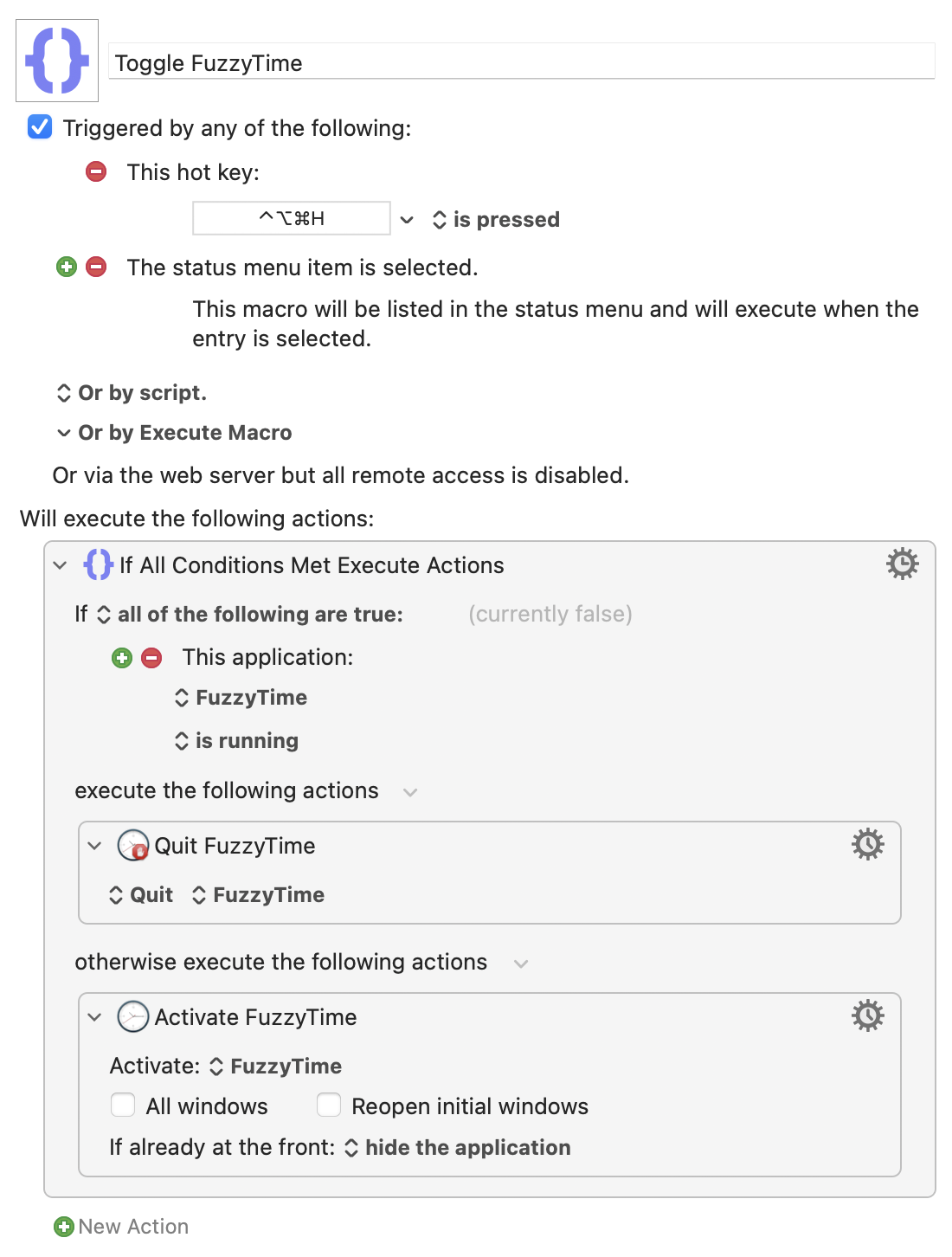
Since I hid the digital clock because I wanted more space in my menubar, it’s not ideal if I see FuzzyTime running all the time. It takes up more space than the digital clock, but it would be nice to toggle it using a keyboard shortcut.
-
I used Keyboard Maestro to automate the display of FuzzyTime.
-
Pressing ⌃⌥⌘H will open FuzzyTime, and pressing the same shortcut again will just quit it, resulting an on/off toggle effect for FuzzyTime in the menubar, which is exactly what I want.
-
-
In essence, here’s how I check the time on my Mac now.
-
Oh, I and still have plenty of space for my app icons in the menubar.
-
What’s up with Twitter these days?
I read: What should I do with my Twitter:
I’ve been trying to figure out what to do with my Twitter/X account. I don’t want to leave it dormant, because the current policy is to reclaim usernames from accounts that don’t post, which creates a risk that someone will come along and claim to be me later on.
I was worried about this, but I don’t care anymore.
Then… The idle elite:
At this point, if you’re still on Twitter, it might be time to accept a hard fact about yourself: there’s not a single thing that its leadership could do that would push you off the site. Since the takeover almost a year ago they’ve fired everyone who cared, they’ve invited back 4chan, kiwifarms, and sundry other threat actors, they’ve started revenue sharing with the rape peddlers and insurrectionists, they’ve given priority lanes to every paying NFT and AI grifter, and even outright blamed the jews for their bad finances. That’s not even close to an exhaustive list!
Twitter is the worst “social media” site you can use nowadays. Look at what is happening with Threads and Mastodon over here.
I still don’t trust Meta, though.
2023.12.06.
Coloring visited links
-
One annoying thing that happened today’s “beautiful” web is that we forgot that we have this CSS selector.
-
a:visited
-
-
I was also sinful in this, since I just pushed a change which adds proper
a:visitedsupport to my site.-
This is mostly annoying for me, since I see almost all links as visited, but can be helpful for readers.
-
-
Now you can see visited links in a different color than the default links.
2023.12.02.
Setting up Type as a quick capture interface for my TaskPaper journal
-
It is a simple app which let’s me append any text (with a timestamp) to plain-text files.
-
Basically a quick capture tool for running lists.
-
LaunchBar can be also used to append text to plain-text files.
-
-
I haven’t kept any running list before in plain text; I just captured these ideas into Things directly.
-
I created a couple of new files using Type in my
~/Documents/Running Listsfolder. Here are some examples.-
Brainstorm.txt-
Following the Natural Planning Model in GTD, sometimes the best way to figure out something is to start writing about it.
-
-
Debug.txt-
Stole this idea from the Type app website.
-
It should be a log of steps I used to figure something out while programming.
-
Since this is just a capture file, steps must be migrated into proper how-tos later.
-
-
Meeting.txt-
A quick log of any meeting I’m attending to capture what we are talking about at the moment quickly.
-
-
-
Type is focused on just one task: append text to these files. It doesn’t disrupt my workflow.
-
But I still treat these files as an inbox in a sense, so after I capture anything here, it should be processed.
-
Instead of introducing yet another inbox, I integrated these files into an existing one.
-
I made a shortcut that is triggered via Keyboard Maestro when I’m reviewing my TaskPaper journal.
-
The shortcut grabs all running files and then lets me pick one.
-
It grabs the content from the picked one, then appends it to my TaskPaper journal as a new entry.
-
Finally, it cleans the picked running list file, so it’s ready for the next batch of ideas.
-
2023.11.30.
What the hell happened to messaging apps?
-
I remember when we had Adium and you could connect almost all of your chat services to one client.
-
Some features were missing, but the basic texting part usually worked.
-
-
We had a way to set our status to online, away, or offline. There was no need for Do Not Disturb or notification management since you just went offline and nobody could reach you.
-
Actually, you can still use Slack like this.
-
Some services even queued up your messages, so the next time you went online, new messages awaited you.
-
I could even set the currently played music as my status.
-
-
Almost all messaging app had some form of proper native Mac app.
-
Remember that Skype for Mac was actually a pretty decent Mac app with AppleScript support.
-
These days, it’s just an Electron app, although nobody uses Skype anymore…
-
-
My friends used MSN Messenger too, which was kind of a crappy client, but at least you could use it through Adium.
-
-
These days, I have to use Cardhop to have proper messaging integration in my contact list to have a central place to jump into the different clients.
-
Almost all clients are stupid Electron apps on the desktop.
-
Mobile clients are better: at least some of the biggest players have proper native apps on iOS.
-
Facebook Messenger for Mac is a React Native app, which is a bit better than Electron.
-
-
I can’t go offline anymore; instead, I have to manage my notifications and schedule them using Focus modes.
-
I kinda miss old IM apps.
2023.11.29.
Messing with Play and YouTube subscriptions
-
Play 2.0 just got released with a new channels feature.
-
It’s behind a subscription, but you can try it for seven days.
-
-
I started using Play as a replacement for YouTube’s Watch Later list (and for other sites too, like Vimeo).
-
YouTube is an attention magnet, and I want to avoid it when possible.
-
Using the Watch Later feature makes this more hard.
-
Play keeps me out of the YouTube app, mostly…
-
-
I also follow YouTube channels using RSS from Reeder instead of the YouTube app.
-
This way, I have an integrated workflow of browsing videos, blog posts, Mastodon posts, etc.
-
I’m also trying to give minimal data to Google through YouTube other than my watch history.
-
I have watch history turned off, but I’m sure Google still tracks it.
-
-
Because of this workflow, it seems redundant to use Play to subscribe to the same list of YouTube channels.
-
-
I added my list of channels to Play anyway to test the Channels feature.
-
It was a bit annoying since Play has no Shortcuts integration for managing channels or OPML import.
-
-
I don’t have a conclusion on the usefulness of this feature for me yet, but I’ll test it in the following week, and we will see if I keep the subscription or not.
2023.11.23.
Giving up the IndieWeb markup on bookmarks for now
-
I’m giving up the IndieWeb markup with bookmarks, since they kinda hard to get right.
-
All I want is a title and a
blockquote, but with the IndieWeb markup I have to have a post content just to markup the link properly. -
So, instead, I just add the “Bookmarked”, “Read”, “Liked”, etc. verbs to the title of the post and be done with it.
-
If someone has a better idea, let me know.
Publish bookmarks from DEVONthink
-
I’m messing with my bookmarks today.
-
I keep a lot of cool articles in DEVONthink as my central repository, but I also want to share some of these links here.
-
I’m testing a simple workflow for this using a DEVONthink smart group, which shows me all my bookmarks from my Decoding database that aren’t published yet.
-
I’m using DEVONthink custom metadata to mark a record “published”.
-
-
This workflow desperately needs automation, but I want to start as simple as possible and see how it works in practice.
Checking webmentions from Bike
-
I also want to check if webmentions are triggered via the WordPress API.
-
Update
-
They do!
-
Adding Safari selection to my “Respond on Decoding” shortcut
-
It is actually occured to me that I can get the current Safari selection in Shortcuts, convert it to Markdown from Rich Text, then Markdown to HTML, then I end up with a blockquote.
-
You need Drafts for the Markdown to HTML action.
-
-
Since all my respond type posts are created using one shortcut which decorates them with microformats, this makes me able to select text, and append it to the post.
-
On the long run, this will give me context on why I saved something to my bookmarks.
2023.11.22.
Interesting blogs
-
I think I’m going to start a new post series called interesting blogs.
-
I just want to save sites that I find on the web into a nice journal format.
-
It doesn’t necessary mean that I’ll subscribe to them using RSS, but can be a cool new tag in my bookmarks.
2023.11.20.
Advanced outline post format
-
I created a more advanced outline post format for my Bike based posts.
-
New entries will use a new
bike-outlineStimulius controller which I originally created for my Zettelkasten, so I can have basic outline capabilities for Markdown lists. -
It gets the post content and adds toggles to each outline row, so I can open and close them.
-
It also uses block IDs as row links, so each outline row can be linked independently.
-
I don’t use Bike outline IDs, but generate them on-the-fly using checksums instead.
-
This will change as I update the content, but it’s fine.
-
Testing interstitial journal importing
-
I’m just testing my blog post saving shortcut for my TaskPaper interstitial journal.
-
I’m creating more rows, just for testing.
-
This one is a child row of the previous one.
-
This one is a child row as well.
-
-
2023.10.30.
-
I don’t really care about the outline display now, because I exported it into Bike.
-
I can collapse, expand, and format it anyway I want.
-
Also, adding new rows/zettels is way easier this way, so I’ll create an export shortcut to Markdown and leave it like that for now.
-
Follow-up on 09:58.
-
Also, what if I migrate my outlining workflow to Bike and generate the outline from that file?
-
It is already an HTML structure and the workflow of linking zettels and inserting them into the outline is easier on my Mac than the iPad, because it has a bigger display.
-
-
This would mean that the outline can link to the actual file in The Archive locally, which can be replaced with a
[[wikilink]]when generating the outline from the Bike HTML.-
I can even do this using Shortcuts, there is no need for Ruby scripting.
-
-
Today’s project is to write a script which generates the Zettelkasten Outline page automatically, since I have zettel IDs present with the structure in note slugs.
-
I also want to make everything collapsed under level 3.
2023.10.29.
Follow-up on “Publish daily notes to my Zettelkasten from Bike”
-
Previously
-
I created a shortcut which can export the current Bike selection to a new Markdown file in my Zettelkasten.
-
It doesn’t sync like my publish script does with WordPress, but it was easier to implement, since copy and paste between Drafts and Bike works pretty well.
-
The shortcut just cleans up the text and sets the title if it’s needed.
-
Otherwise it will create a headless zettel.
-
-
At the end it opens the note in The Archive app where I can edit it, or publish it using Git.
-
This shortcut actually uses the following apps.
-
Keyboard Maestro to copy and paste the text from Bike to Drafts.
-
Shortcuts to clean-up the Markdown output.
-
Then Drafts to create a new Markdown file in my Zettelkasten.
-
-
-
-
In the video Archive complains about the “writing test”.
-
It’s not related to the shortcut.
-
Shortcut: Open Mastodon Posts on Micro.blog
-
I’m spending my time today to integrate Micro.blog into my workflow.
-
I also used Micro.blog to reply Mastodon posts a couple of times before.
-
I follow people using RSS on Mastodon.
-
I don’t have a Mastodon account, and don’t plan to create one.
-
Replying to their posts from my RSS reader sucks, since I have to search for them on Micro.blog, type their username, find the post, then I can press the Reply button.
-
-
There should be a better way to find Mastodon posts on Micro.blog.
-
I created a shortcut which seems to work most of the time.
Publish daily notes to my Zettelkasten from Bike
-
I’m tinkering with the idea of using my Bike journal to publish to my Zettelkasten directly.
-
I don’t use month based files anymore in Bike, I create a new outline for each day.
-
My Zettelkasten is a Jekyll based site, so I have to work with Markdown content.
-
It would be nice if I could convert these notes to Markdown files, then publish them to my Zettelkasten site directly.
-
I found this project which does exactly this.
-
-
In theory, I would use my publish script to manage the Zettelkasten daily notes in the same pipeline as my WordPress posts.
-
Daily notes would be pre-filtered though.
-
I just export notes with the
ZETTELmarker only. -
I have to create a new Bike document for each entry before converting it to Markdown because I want to have separate notes for each entry, not just one big daily note.
-
-
I could use a daily Markdown file and keep that open in The Archive app, but I want to use Bike for this, because it is the best thinking and outliner tool.
-
Also I’m already writing my journal in Bike. I don’t want to have another app.
-
-
As an interim solution, I created a Keyboard Maestro macro which copies and pastes the current entry into Drafts (and also converts it to Markdown), where I can post it manually.
2023.08.09.
Bike row types
-
The latest release of Bike just added row types which makes it way more useful.
-
Here’s a video on how this feature works.
-
I have some projects which use TaskPaper for project support, but I’ll starting using Bike more for.
-
Thanks to the new “task” row type, it’s quite an easy switch.
-
2023.04.07.
Adding Bike Shortcuts integration to my publishing setup
-
Previously…
-
I created two new shortcuts which are helping me to start to write a new post from Bike.
-
The first one called “Open Decoding File”, which opens (and optionally creates) the current month’s file.
-
I have monthly files, because of how my publishing script works.
-
It publishes every post from the currently opened Bike file, so I don’t want to keep the same long outline around for blogging.
-
It regenerates each post every time I’m adding a new one.
-
If there is a breaking change in the system, I can archive old files and just start a new one.
-
-
-
The second one just inserts today’s date into the top, with an “
DRAFT” block which can be used to start writing a new post.-
I added a Keyboard Maestro macro to run this one from Bike.
-
I can press
⇧⌥⌘Tto add a new date block on the top.
-
-
-
These shortcuts are using the Shortcuts integration which is available in the preview version.
-
Here’s a demo video.
2023.02.01.
This is a test
-
I’m just testing Hookmark integration with my Bike blogging script.
-
Update
-
So now I can…
-
Blog freely in Bike using a new outline for each month.
-
I can keep posts private using the SKIP keyword.
-
Or I can publish them on the blog by adding a timestamp.
-
-
-
I removed embedding the permalink into the root node. Instead I use Hookmark to navigate between the post and the Bike node.